
Last updated: 2026-08-04
How we evaluate AI design tools
Most “AI for designers” pages are ranked dumps. They tell you a tool is popular. They rarely tell you whether it survives Monday: export, commercial terms, handoff into Figma or Illustrator, or a client review.
This page is the ruler behind our shortlists—not another Best-of dump. If you ship UI, brand, or image work (or curate tools for people who do), you can reuse the same five questions. Pieces like Best AI Tools for UI/Product Designers and Best AI Logo Generators are this bar with different weights.
We do not crown a #1 tool here. We ask whether something belongs in a working stack at all.
The five criteria
Weights shift by job. UI work usually stresses Figma fit. Brand/logo work stresses vector handoff and commercial clarity. The questions stay the same.
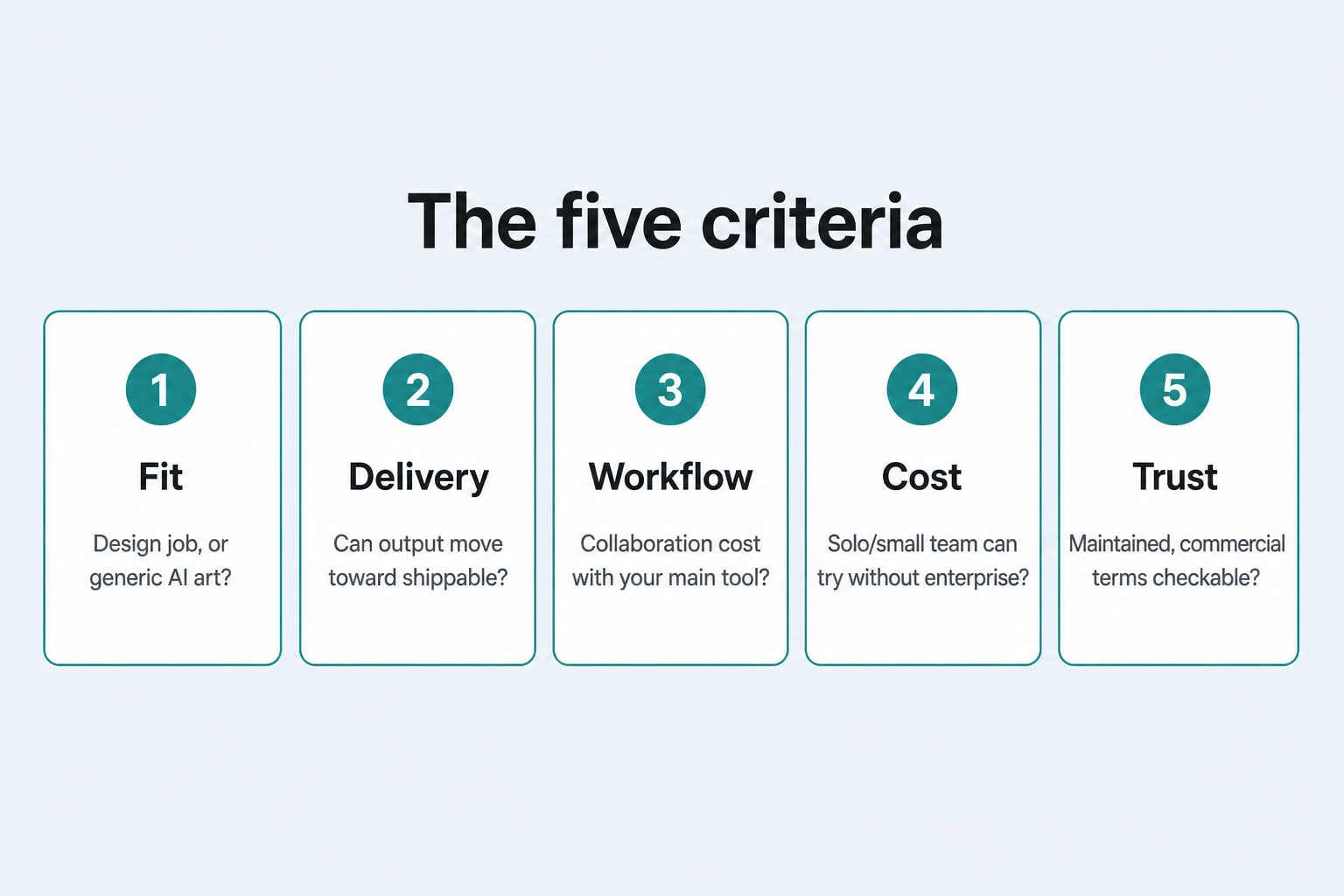
1. Fit — Is this a design job, or generic AI art?
Ask: Does the tool serve a specific design occupation or task (screens, marks, icons, upscale, handoff)—or is it a general image/chat toy with “design” in the marketing?
Pass when: The primary use matches the brief (wireframes, logo concepts, controllable vectors, in-Figma assist).
Fail when: The demo is pretty stills with no path into interface or identity work.
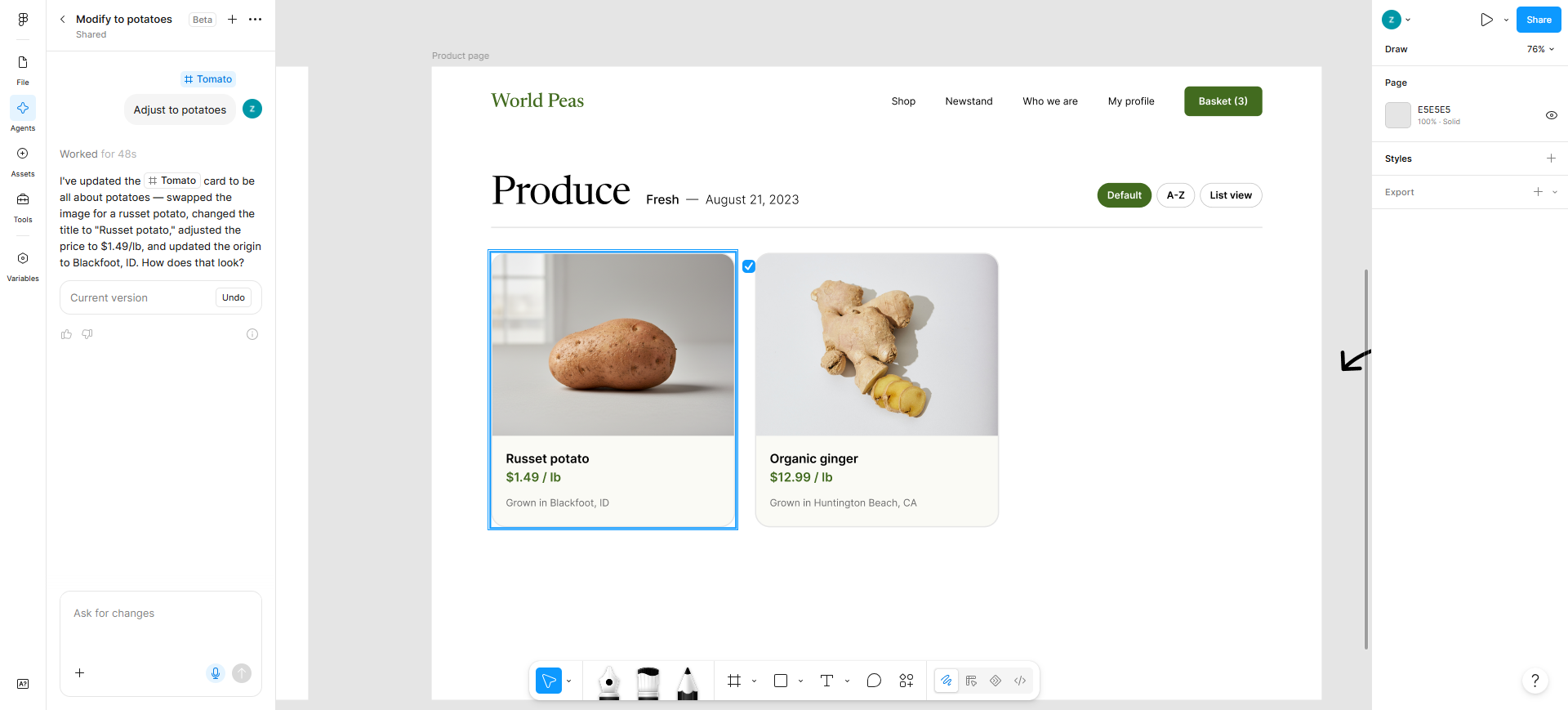
Example: Figma AI scores high on Fit for UI/product teams because it sits inside the file you already ship from. A generic text-to-image app with no design-system or layout intent fails Fit for the same job—even if the renders look “premium.”
2. Delivery — Can the output move toward something shippable?
Ask: Can you take the result somewhere real—editable design file, vector, kit, or front-end starting point? Or are you stuck with a gallery PNG?
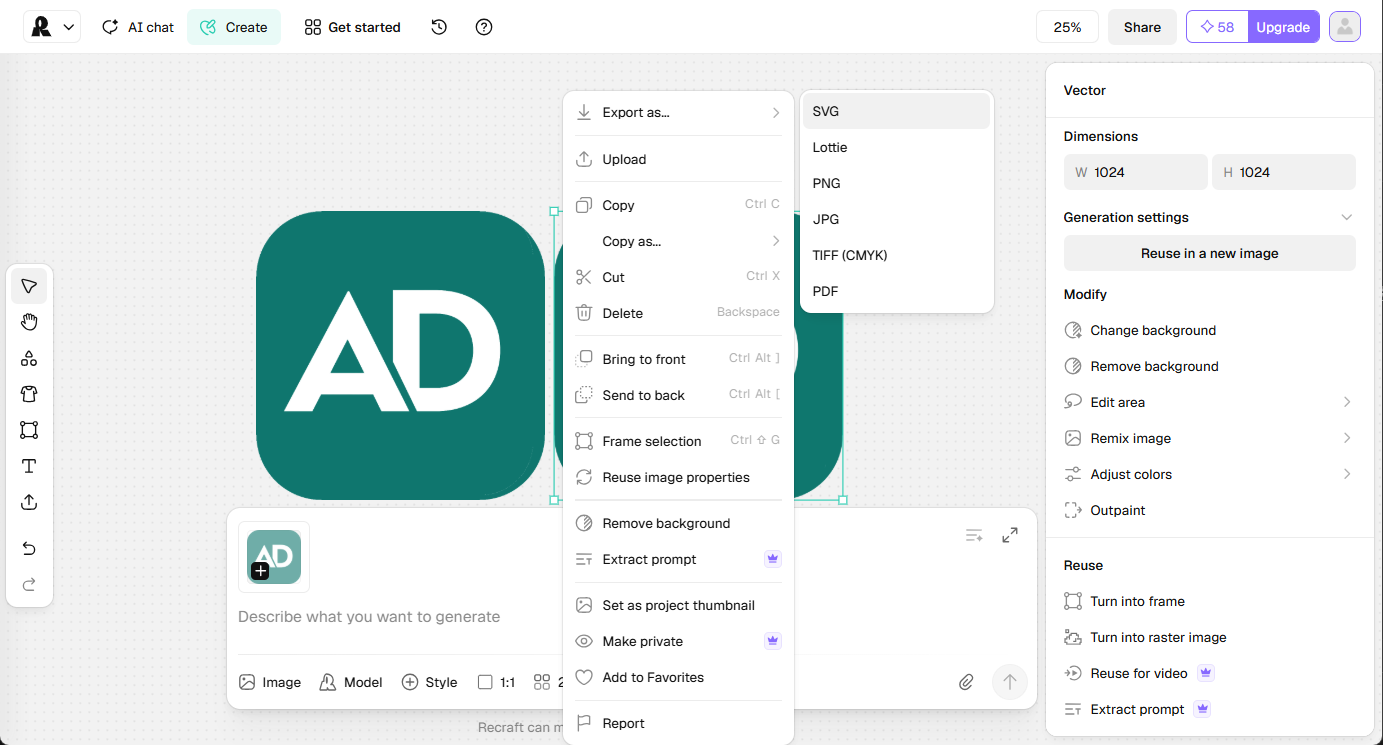
Pass when: There is a credible export or continue-in-tool path (SVG/EPS, Figma paste, code scaffold, brand-kit files). PNG-only is fine for exploration, not for calling the job done.
Fail when: Every useful format is locked behind unclear terms, or the only output is a social-ready raster you cannot maintain.
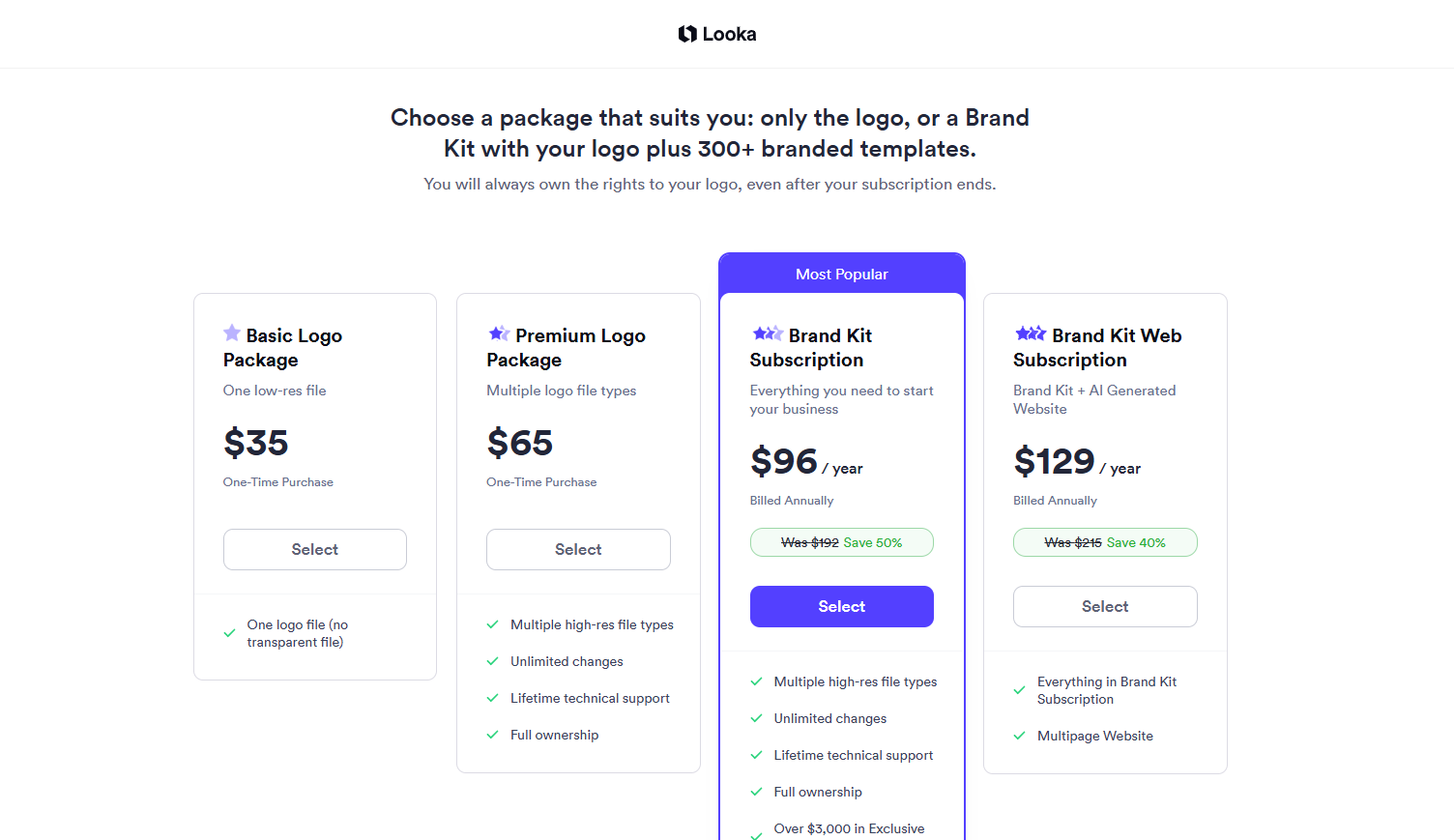
Example: Looka passes Delivery only on the right package: Basic Logo is one low-res PNG (explore/mock). Premium Logo or Brand Kit unlock hi-res and vector-oriented files plus (on Brand Kit) matching assets. Calling any free preview “delivered identity” fails this bar. Same idea on logo kits generally: pay tier and file type decide Delivery, not the homepage hero.
Domain note we keep repeating: AI is strong at concepts. Lockup, clear space, mono/reverse variants, and trademark-level cleanup still sit with a human—usually in Illustrator or your vector tool of record.
3. Workflow — What’s the collaboration cost with your main tool?
Ask: Does this sit next to the canvas your team already uses, or does it force a parallel universe you abandon after the demo?
| Job cluster | Workflow usually means |
|---|---|
| UI / product | Figma (or equivalent) fit, components, comments, handoff |
| Brand / logo | Illustrator / vector editability, kits that don’t trap the mark |
| Icons / brand assets | Controllable vector/style export into the library you maintain |
Pass when: Handoff cost is acceptable—paste to Figma, download SVG, redraw once with a clear source.
Fail when: Every stakeholder must learn a new silo for a one-off aesthetic.
Example: Figma AI is Workflow-native for Figma teams (seat and credit limits still matter—check current plan access). Recraft fits when you need design-controlled vectors/icons to pull into Illustrator or Figma—not when you only wanted a founder “logo wizard” with a one-click kit (Looka / peers cover that shape of job).
4. Cost — Can a solo or small team try without enterprise theater?
Ask: Is there a credible free or freemium path to evaluate, and a clear paid step for real work—without requiring a sales call for a single designer?
Pass when: You can test the Fit/Delivery path before committing; paid tiers are understandable (one-time kit, credits, seats).
Fail when: “Contact sales” is the only way to see whether export or commercial use works.
We still don’t quote dollar amounts in evergreen articles—tiers change. We do care whether Free is honest exploration or a trap (no commercial license, public gallery, no transparent export).
Example: Recraft’s Free plan is useful to try the product, but Free outputs are public, owned by Recraft, and not licensed for commercial use. Client or sellable assets need generation while on a paid plan (rights attach at generation time). That Cost/Trust detail is why Free ≠ “ready for the brand deck.”
5. Trust — Is it maintained, and are commercial terms checkable?
Ask: Is the product still clearly alive? Can you read what you own, what’s public, and what’s commercial—before you paste an unreleased client name into the prompt box?
Pass when: Pricing/docs exist, licensing is findable, and you’re not guessing from a tweet.
Fail when: Terms are fog, the product looks abandoned, or Free silently publishes confidential work.
Examples:
- Recraft: ownership and commercial rights are spelled out on their pricing FAQ—don’t assume Free equals client-ready (see Cost above).
- Looka: Brand Kit messaging includes full logo ownership even after the subscription ends—still verify current terms before you promise a client.
- Figma AI: seat- and credit-gated features count as Trust too—confirm your org enabled what you’re recommending in a sprint.
Trust is also why we refuse empty “#1” and “industry-leading” language on this site. Rankings without a bar are marketing, not evaluation.
How weights change by scenario
Same five questions; different emphasis:
| Scenario | Lean on | Soften (don’t ignore) |
|---|---|---|
| UI shortlist | Fit + Workflow (Figma) + Delivery into components/handoff | Pure illustration wow |
| Logo / identity | Delivery (vector/kit) + Trust (commercial) + Fit to marks | Generic image-gen novelty |
| Icons / brand assets | Delivery (controllable vector) + Trust | One-shot logo kits |
| Upscale / cleanup | Delivery (usable file for mockups) + Cost | Brand strategy narrative |
That’s why a tool can pass on a logo article and fail on a UI Pack—or show up only as a neighbor (e.g. Recraft on a logo list) instead of as a “logo generator.”
What this rubric is for
- Deciding what enters a Pack or a Best-of shortlist on this directory
- Writing “Don’t use if…” with an exit path, not vibes
- Explaining to a client or teammate why a viral demo didn’t make the cut
Browse living shortlists and Packs from here: UI/Product article · Logo generators · Packs
When this rubric does not apply
Skip or heavily adapt this bar if:
- You’re collecting inspiration only (moodboards, taste)—Fit/Delivery still help, but you may tolerate PNG-only.
- You need a finished logo system or full VI tomorrow (clear space, forbidden uses, trademark search). No AI shortlist replaces craft and counsel; see Best AI Logo Generators for task-level boundaries.
- You want a free-tools shopping list—that’s a different piece (L-list), not this method page.
- You’re comparing exactly two products for one decision—use a dedicated comparison when the difference narrative is thick enough; this page won’t crown a winner.
- The job isn’t design delivery (pure coding agents, pure video entertainment, etc.)—wrong aisle for this site.
How we use this on AI Design Kit
- Tool pages should answer Fit and Delivery in plain language (who it’s for, when to skip).
- Packs are short kickoff lists, not encyclopedias.
- P/T articles apply these five criteria with scenario weights; they link back here so we don’t reinvent the ruler every week.
If a tool you rely on fails our bar unfairly—or belongs and isn’t listed—submit it.
What’s next
Upcoming task guides (wireframe, Figma workflow, and later Brand Pack overview) will keep using this same bar. When those go live, they’ll point here instead of restating a new philosophy each time.